
# AI desk Pro Agent Customization
# Overview
Use the Agent Customization section to configure both the identity and the behavior of an agent.
To access this section:
- Go to the Configuration tab
- Select Agent Customization
The interface contains two main tabs:
- Identity
- Features
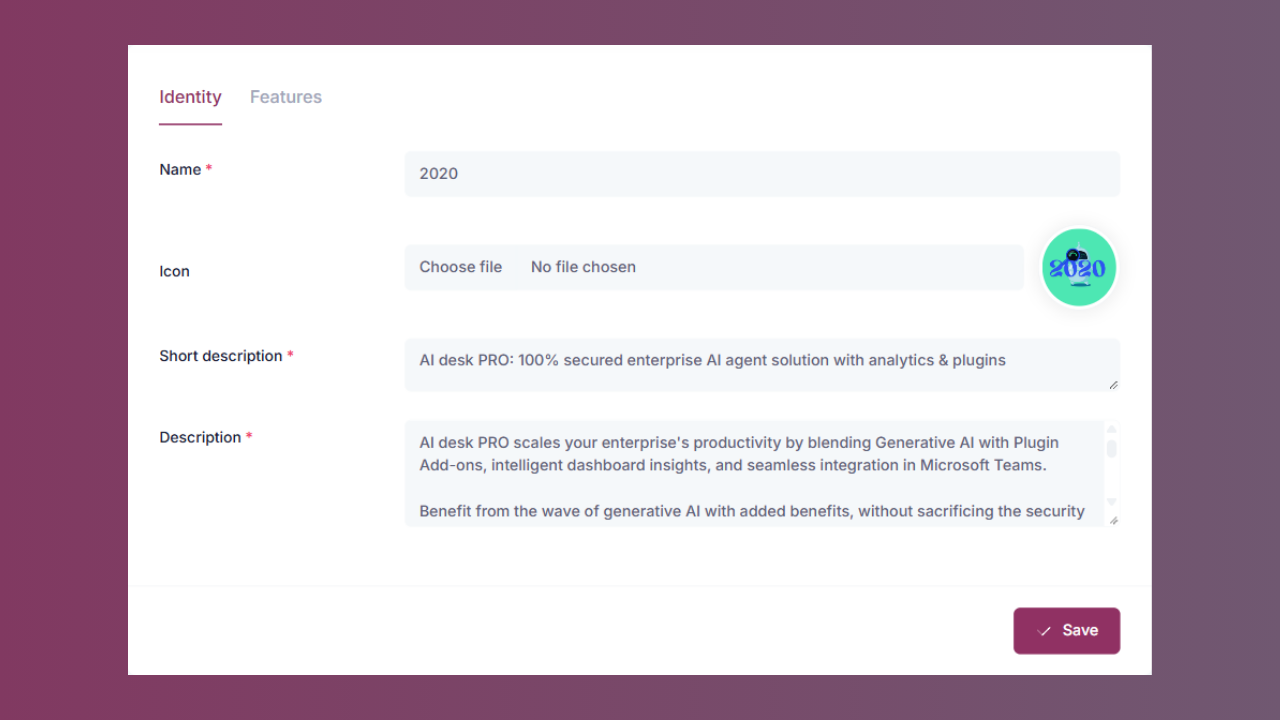
The Identity tab defines how the agent appears.
The Features tab defines how the agent behaves.
# Identity
Use the Identity tab to configure how the agent is presented to users.
# Name
The Name field defines the display name of the agent.
# Purpose
- Clearly identify the agent within the organization
- Reflect the business use case (for example, HR Pilot, IT Assistant, Finance Bot)
- Maintain consistency across deployments
This field is mandatory.
# Icon
Use the Icon field to upload a visual representation of the agent.
# Purpose
- Improve visual recognition
- Align the agent with department or company branding
- Enhance the user experience
The icon is displayed next to the agent name in the interface.
# Short description
The Short description field is a one-line summary of the agent. It is written into the description.short property of the Microsoft Teams app manifest, so it is the text users read in the Microsoft Teams app catalog and in the agent list, before they ever open the agent.
# Purpose
- Tell users at a glance what the agent is for
- Identify the agent in the Microsoft Teams app catalog and agent list
- Stay short enough to remain readable on a single line
This field is mandatory. It accepts up to 80 characters, the limit Microsoft Teams applies to description.short in the app manifest. The full Description field accepts up to 4,000 characters, the matching manifest limit for description.full.
If an agent is created without a short description, AI desk Pro derives one from the Description field: the text is collapsed onto a single line and shortened to fit, ending with an ellipsis. Write your own short description whenever you can, because a derived one rarely reads as well as a tagline you wrote.
Both descriptions are escaped before they are inserted into the manifest, so a line break or a quotation mark in either field no longer produces an app package that cannot be installed. Shortening also respects character boundaries, so an emoji is never cut in half.
# Description
The Description field defines the functional summary of the agent.
# Purpose
- Explain the scope of the agent
- Clarify its role and capabilities
- Provide context to administrators and users
The description should clearly state:
- What the agent does
- In which context it operates
- What type of support or knowledge it provides
This field is mandatory, and it accepts up to 4,000 characters.
# Features
Use the Features tab to configure how the agent processes knowledge, handles context, and integrates with external systems.
These settings influence:
- Knowledge prioritization
- Context handling
- Search capabilities
- Integration exposure
Each feature can be enabled or disabled depending on organizational needs.
# Privacy and security
# Anonymous mode
Mask user identity to reinforce confidentiality.
When enabled:
- User identities are not displayed in conversations
- User identities are not visible in conversation history
- Interactions are processed without being linked to a named user
The conversational experience remains fully functional.
Recommended for environments requiring enhanced confidentiality.
# Content and capabilities
# Balanced content ranking
Prioritize Q&A and documents equally for optimal relevance.
When enabled:
- Q&A and documents are evaluated at the same priority level
- The agent applies a structured arbitration logic
- Knowledge usage remains consistent and context-aware
# Document Match Threshold
The Document Match Threshold is the minimum match confidence a document passage must reach before the agent is allowed to use it as a source. It is a relevance floor on a 0 to 1 scale, and it is set per agent, so two agents in the same tenant can be tuned differently.
How it changes retrieval:
- Raising the threshold returns fewer but more on-target sources. Loosely related passages are dropped, so off-topic citations become rarer, at the cost of the agent more often reporting that it did not find the information.
- Lowering the threshold broadens recall. The agent considers more passages, which helps with sparse or loosely worded content, but weaker matches can make it into the answer.
The threshold applies everywhere the agent retrieves documents: Microsoft Teams, the webchat, and the MCP search tool. Q&A pairs are governed by their own separate match threshold.
The default is 0.8, the same fixed value that previously applied to every agent platform-wide. Existing agents keep the behavior they have today, and changing the threshold does not require re-indexing your documents.
# Web Search (Preview)
Targeted web search with the ability to define custom sources and domains.
In Preview mode, web queries are limited to 10 per agent per month.
When enabled:
- The agent can retrieve controlled web-based information
- Administrators can restrict domains
- External data complements internal knowledge
# Search provider
Web search now uses the Tavily provider by default (previously SerpAPI, which remains selectable via configuration). Tavily returns ranked page content with a real relevance score and enforces the domain allow-list server-side in a single call.
Because results are ranked by this relevance score, users may notice that web-search citations are ordered differently than before.
This feature is currently in Preview and may evolve.
# SourceSense (Preview)
Conversational experience with contextual references visible throughout the conversation.
When enabled:
- References remain visible across exchanges
- Context is incorporated in a structured format
- Responses align with transparency and explainability principles
SourceSense is currently available in Preview.
# AI model
AI desk Pro supports multi-model: each agent can be configured to use a different AI model. That way you can match the model to the use case and manage costs separately for each agent.
In the Admin Center, the model is selected in the Generation model section of the agent's configuration page (this section was previously labeled Answer model).
# Standard and Premium models
AI desk Pro offers two categories of models:
- Standard models: included in all subscriptions and available by default on every agent.
- Premium models: advanced models that require a Premium subscription. The Premium subscription is not unlimited: it provides a monthly pack of Premium sessions that are consumed each time a Premium model is used.
The Premium models currently available are:
| Model | Provider |
|---|---|
| Claude Opus 4.8 | Anthropic |
| Mistral Large 3 | Mistral AI (via Azure AI Foundry) |
# How sessions work
AI desk Pro usage is measured in sessions. The counting method depends on whether SourceSense is enabled on the agent.
Without SourceSense: One session = 20 messages total (user + agent), or 10 full exchanges.
With SourceSense enabled: One session = 1 exchange (one user message + one agent response).
New conversation: Each time a user selects New conversation, it counts as +1 session, regardless of how many messages were exchanged in the previous conversation. New-conversation sessions are always deducted from the standard quota, even on agents that use a Premium model.
The message-based counting rules apply to both standard and Premium sessions. When a Premium model generates the answers, the sessions consumed are deducted from the Premium session quota instead of the standard quota.
Premium sessions are shared across the entire tenant, across all agents and all users.
The same rules are summarized on the My Subscription page, where you can track standard and Premium session consumption.
# Getting started: Premium trial
Before you buy, you can evaluate Premium models with a free trial:
- 50 Premium sessions included
- Valid for 7 days from the moment of activation
- Can be activated only once per subscription and cannot be restarted once it has expired
- Automatic notifications are sent as expiration approaches
The trial offer appears directly in the model selector: if your subscription has no Premium pack and you select a Premium model, a dialog titled Start your free premium trial offers to activate it. To confirm, you must check a consent box acknowledging that the free trial can be activated only once per subscription; the activation button stays disabled until you do. If the trial has already been used, the dialog says so instead of offering it again.
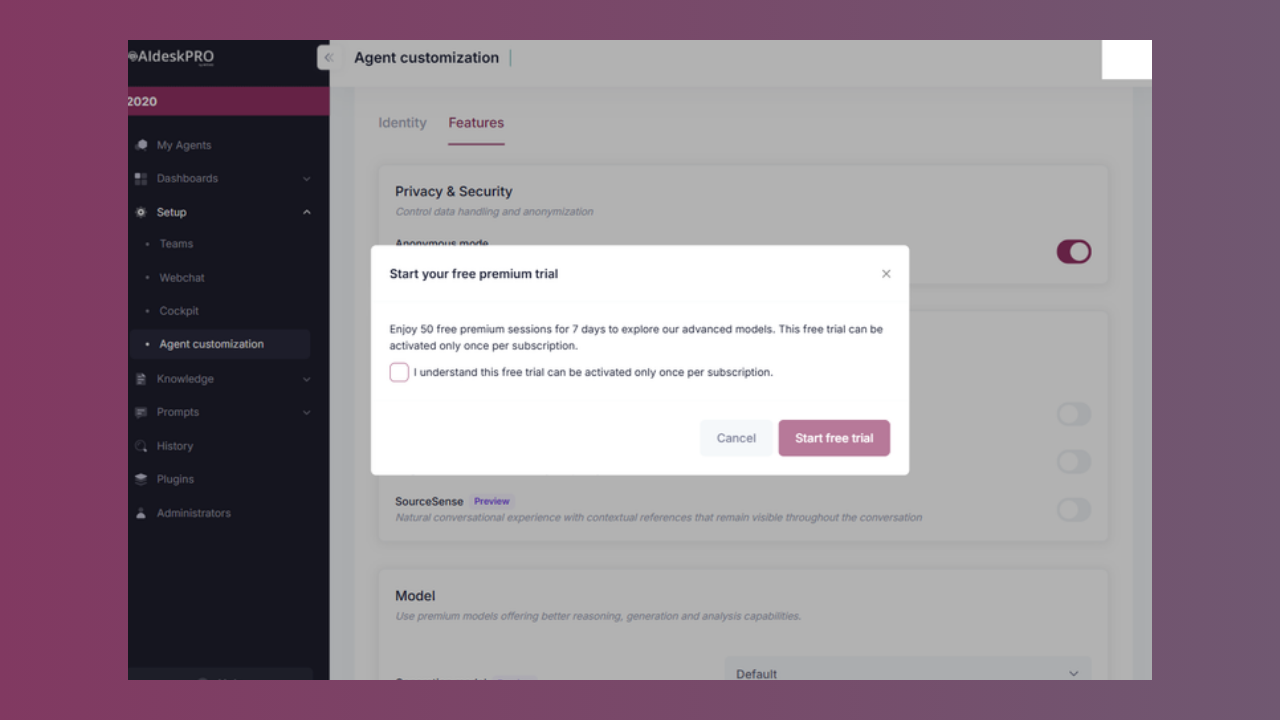
While the trial is active, the model selector shows how many trial sessions and trial days remain.
When the trial period ends, all agents automatically switch back to standard models. No action is required and there is no service interruption.
# Purchasing Premium sessions
Premium session packs are purchased through your Account Manager. Each pack grants a defined number of Premium sessions valid for one calendar month.
At the start of each new month, the quota resets automatically and Premium models become available again.
# When the monthly quota is exhausted
When all Premium sessions for the current month have been consumed:
- AI desk Pro remains fully accessible
- Premium models become unavailable for the rest of the month
- All agents automatically fall back to the default standard model, and users see a short notice in the conversation before the answer
- The model selector shows a Premium models deactivated badge on affected agents
- Administrators receive a notification
Premium models stay visible in the model selector, but selecting one while the quota is exhausted opens a Premium sessions exhausted dialog instead of applying the change:
- On a purchased Premium pack, the dialog offers a Contact my account manager action.
- On the free trial, the dialog offers an Add premium sessions action that opens a pre-filled email to the sales team.
Saving a Premium model selection is also rejected server-side while Premium sessions are unavailable, so the restriction cannot be bypassed.
There is no service interruption and no impact on the standard conversational experience.
To restore access to Premium models before the end of the month, contact your Account Manager to extend the current pack. Otherwise, the quota resets automatically at the start of the following month.
# Integrations
# MCP (Preview)
Model Context Protocol: enable the use of the agent via MCP.
The MCP feature allows organizations to use the agent in their own environments or orchestrations as an MCP Tool.
When enabled:
- The agent can be invoked from an MCP-compatible environment
- The agent can be integrated into internal workflows
- External platforms can call the agent
Use cases:
- Multi-agent orchestration
- Internal system integration
- Third-party platform invocation
Important information:
- MCP is currently in Preview
- Activation is optional
- Intended for environments with compatible infrastructure
For detailed setup instructions, including Microsoft Entra ID configuration and MCP client connection guides, see the dedicated MCP Server documentation.
# Preview terms and conditions
Features marked as "Preview" are subject to specific usage conditions.
Before you enable any Preview feature, review the AI desk Pro Preview features terms and conditions.
Preview features:
- May evolve during the evaluation phase
- May have usage limitations
- Are not covered by standard production SLAs
- Are intended for controlled evaluation environments