
# AI desk Pro Preview Features
# What are Preview features?
Preview features in AI desk Pro provide early access to selected capabilities before their broader availability.
They allow customers to:
- Discover upcoming enhancements
- Evaluate new behaviors or configurations
- Provide structured feedback
- Anticipate future platform evolution
Preview features:
- Are governed by specific Supplemental Preview Terms of Use
- Are intended for controlled evaluation
- May evolve during the Preview phase
- May have limited scope or availability
- May be updated, refined, or withdrawn at any time
Enabling a Preview feature does not constitute a roadmap commitment or a guarantee of general availability.
# Important considerations before enabling Preview
Before activating Preview mode:
- Ensure activation is limited to appropriate agents
- Avoid relying on Preview features for critical business processes
- Inform relevant internal stakeholders
- Review the applicable Preview Terms
Preview features are designed for controlled evaluation environments.
# How do I enable Preview mode?
# Prerequisites
To enable Preview mode, you must:
- Have administrator permissions for the relevant agent
- Have access to the agent configuration settings
If you do not have the required permissions, contact your system administrator.
# Enable Preview mode (Agent-level activation)
- 1
Sign in to AI desk Pro.
- 2
Open the relevant Agent.
- 3
Navigate to Agent Personalization.
- 4
Locate the Preview Mode setting.
- 5
Toggle Preview Mode to On.
- 6
Save your changes.
Preview mode becomes active immediately after saving.
# What happens when Preview mode is activated?
Once enabled:
- The selected Preview capabilities become active on the agent
- The agent's behavior or internal logic may evolve during the Preview phase
- Changes may occur without additional notice
Preview mode can be disabled at any time by toggling the setting to Off.
# Preview Feedback Collection
As part of Preview mode, feedback must be submitted exclusively through the dedicated Preview Evaluation Form.
Submit your Preview feedback here (opens new window)
The form allows you to:
- Describe the usage context
- Compare expected versus observed behavior
- Analyze before/after differences
- Qualify the perceived impact on user experience
# Important
- Feedback submitted through this form is reviewed globally
- It does not trigger individual follow-up or personalized responses
- The Preview form is not a support channel
- No support tickets should be opened for Preview features
Using the form ensures structured and consistent feedback analysis during the Preview phase.
# Support and Scope
Preview features:
- Are not covered by standard production SLAs
- Should be enabled in controlled scenarios
- Are intended for evaluation and early exploration
# Summary
Preview mode in AI desk Pro enables organizations to:
- Access selected capabilities early
- Evaluate platform changes in a controlled environment
- Contribute to product improvement through structured feedback
Activation is optional, reversible, and managed at the agent level. Final decisions regarding general availability remain at the sole discretion of AI desk Pro.
# Model
# Multi-model (Preview)
The Multi-model feature allows administrators to select the AI model used by each agent. It includes access to Premium models: advanced models from third-party providers not included in the standard offer.
Premium models currently available in Preview:
| Model | Provider |
|---|---|
| Claude Opus 4.8 | Anthropic |
| Mistral Large 3 | Mistral AI |
As Premium models are used through third-party providers, their use is subject to the providers' own terms and data processing conditions. For details, see AI Models and Terms.
Usage of Premium models is measured in Premium sessions, which are separate from standard sessions and managed through a monthly pack. For details on session counting and quota management, see Agent Customization – AI Model.
This feature is currently in Preview and may evolve.
# Cockpit (Preview)
The Cockpit is a centralized configuration hub for AI desk Pro agents. In Preview, it enables administrators to manage agent settings, knowledge base configuration, and deployment parameters from a unified interface.
# Participant Evaluation
If you are a Preview participant for the Cockpit feature:
- Download the evaluation template to assess the Cockpit in your environment
- Complete the evaluation form with your findings and use cases
- Submit feedback through the Preview Evaluation Form (link above)
Download Cockpit Evaluation Form (Excel)
The template guides you through:
- Feature discovery and exploration
- Configuration workflow assessment
- Integration points with your current setup
- Recommendations for your organization
# Scope and Limitations
During Preview:
- The Cockpit interface may evolve significantly
- Some features may be refined or repositioned
- Feedback from participants directly influences the final design
All feedback is valuable and will be reviewed as part of the Preview evaluation phase.
This feature is currently in Preview and may evolve.
# Support Tickets (Preview)
Support ticketing lets your users open and follow a support ticket without leaving the agent: from a conversation in Microsoft Teams or Webchat, and from the My Tickets widget in the Cockpit. Administrators process those tickets from a dedicated Tickets dashboard in the Admin Center, where they can reply, set a status and a priority, and track resolution.
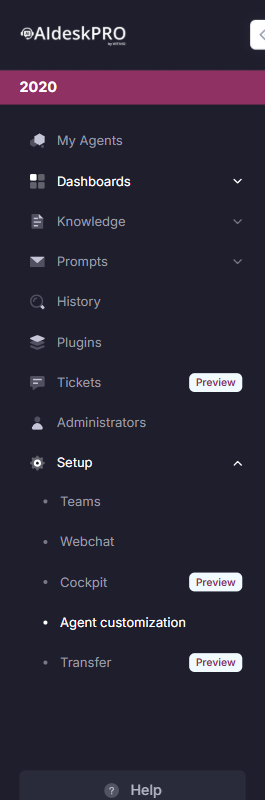
Both the Cockpit and Tickets entries in the Admin Center sidebar are marked with a Preview badge. For the full description of the ticket workflow, see Support Tickets.
This feature is currently in Preview and may evolve.
# Supplemental Terms of Use
# AI desk Pro Preview Features
The sections below are the supplemental terms that govern every AI desk Pro Preview feature. They apply in addition to the agreement governing your use of AI desk Pro.
AI desk Pro may make certain features, behavioral capabilities, parameters, or internal evolutions available in Preview mode ("Preview Features"). Preview Features are licensed under the agreement governing your use of AI desk Pro.
# 1. Nature of Preview Features
Preview Features:
- Are made available on an early-access basis
- May evolve, be modified, or be discontinued at any time
- May have limited functional or behavioral scope
- May be available only in selected environments, agents, or regions
- Do not constitute a commitment to general availability
# 2. No Warranties and No SLA
UNLESS OTHERWISE EXPRESSLY STATED IN THE MASTER AGREEMENT, PREVIEW FEATURES ARE PROVIDED "AS IS" AND "AS AVAILABLE."
PREVIEW FEATURES ARE NOT COVERED BY SERVICE LEVEL AGREEMENTS (SLA).
AI DESK PRO MAY MODIFY, SUSPEND, OR DISCONTINUE A PREVIEW FEATURE AT ANY TIME.
# 3. Authorized Use
Preview Features must not be used for critical business processes.
Activation must occur within controlled environments.
The Customer is solely responsible for assessing risks associated with enabling Preview Features.
# 4. Security, Compliance, and Data
Preview Features may be subject to different or reduced commitments regarding:
- Security
- Regulatory compliance
- Data residency
- Data retention
- Privacy
The Customer remains responsible for assessing whether the Preview Feature is appropriate for its regulatory and legal obligations.
# 5. Generative AI-Related Features
Certain Preview Features may incorporate generative AI capabilities.
Behavior and outputs may evolve.
Appropriate human oversight is required.
# 6. Restricted Early Access Preview
Experimental or early-access Preview Features are intended solely for internal evaluation.
They may not be shared, disclosed, or exposed to third parties without prior written authorization.
# 7. Limitation of Liability
TO THE MAXIMUM EXTENT PERMITTED BY APPLICABLE LAW, AI DESK PRO SHALL NOT BE LIABLE FOR ANY INDIRECT, INCIDENTAL, SPECIAL, CONSEQUENTIAL, OR PUNITIVE DAMAGES ARISING FROM THE USE OF PREVIEW FEATURES.
TOTAL LIABILITY RELATING TO PREVIEW FEATURES SHALL BE LIMITED TO DIRECT DAMAGES NOT EXCEEDING THE AMOUNT PAID BY THE CUSTOMER DURING THE PRECEDING TWELVE (12) MONTHS.
# 8. General Availability Decision
AI DESK PRO RETAINS SOLE DISCRETION TO GENERALIZE, MODIFY, MAINTAIN IN PREVIEW, OR DISCONTINUE ANY PREVIEW FEATURE.
Activation of a Preview Feature does not constitute a contractual commitment to future availability.
# 9. Potential Pricing Evolution
Certain Preview Features may, following the evaluation phase, be:
- Included in a paid plan
- Offered as a paid add-on or module
- Integrated into a different subscription tier
Access to a Preview Feature during the evaluation phase does not guarantee future free access.
Any pricing evolution will be communicated prior to activation or billing.