
# GPT Pro Pricing and Subscription
GPT Pro is the AI chat assistant for Microsoft Teams. You buy and manage it through in-app purchase in the Microsoft Teams Store, and each plan sets how many messages you can send in a rolling 3-hour window. This page explains how usage is counted and what each plan includes.
# Choose your plan
GPT Pro comes in three plans, so you only pay for the usage your team needs. The plans share the same assistant and privacy model, and differ by how many messages each user can send per rolling 3-hour window.
Starter
Everyday AI help for lighter use.
- 30 messages per rolling 3-hour window
- AI chat assistant inside Microsoft Teams
- Streaming responses as the answer is written
- Private by design: only the text you type is processed
Premium
More room for regular daily use.
- Everything in Starter
- 100 messages per rolling 3-hour window
- Start a free Premium trial: one month free, no commitment
Platinum
The highest allowance for heavy users.
- Everything in Premium
- 200 messages per rolling 3-hour window
- Priority support with faster response times
# How usage is counted
GPT Pro uses a rolling 3-hour usage model. Each plan includes a set message allowance, and your usage refreshes continuously as older messages fall outside the 3-hour window.
One message equals one user message or one GPT Pro response. Both what you send and what the assistant replies count toward your allowance.
Examples:
- You send 5 messages and GPT Pro replies 5 times, so 10 messages are counted.
- You ask for 3 variations in separate turns, so those replies are counted individually.
# What happens when you reach the limit
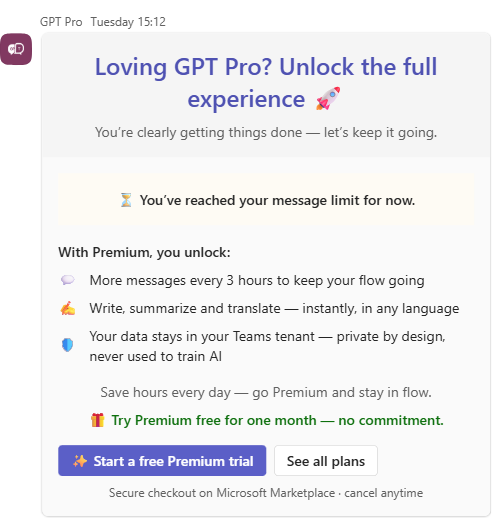
When you reach your plan allowance, GPT Pro pauses and shows an upgrade notice. You can either wait for the rolling window to refresh or move to a higher plan.
The notice adapts to the plan you are on today:
- Free or Starter: you are offered Premium, with a Start a free Premium trial button that opens the plans page. The trial runs for one month, with no commitment.
- Premium: you are offered Platinum, for its higher allowance and priority support. Platinum has no free trial.
- Platinum: you see a plain limit notice and no upgrade offer, because Platinum is already the top plan.
# Buy or upgrade your plan
Pricing and purchase are handled through in-app purchase in the Microsoft Teams Store.
- Plans and pricing: review current plans and prices on the Microsoft Marketplace listing.
- Product page: see features and pricing on the GPT Pro product page.
# Related pages
← Fundamentals Q&A →