
# GPT Pro Limits
Knowing what GPT Pro can and cannot do helps you plan how your team uses it. These limits keep the assistant fast and reliable for everyone. GPT Pro is a conversational AI assistant, so it does not upload documents, run plugins, or index a knowledge base.
# Platform
- Microsoft Teams only: GPT Pro runs inside Microsoft Teams, in personal chats, group chats, and teams. It is not offered as a standalone web or desktop app.
# Message allowance
GPT Pro counts the messages each user sends within a rolling 3-hour window. The number of messages allowed in that window depends on your plan.
| Plan | Messages per rolling window |
|---|---|
| Free | 5 |
| Starter | 30 |
| Premium | 100 |
| Platinum | 200 |
# When you reach your allowance
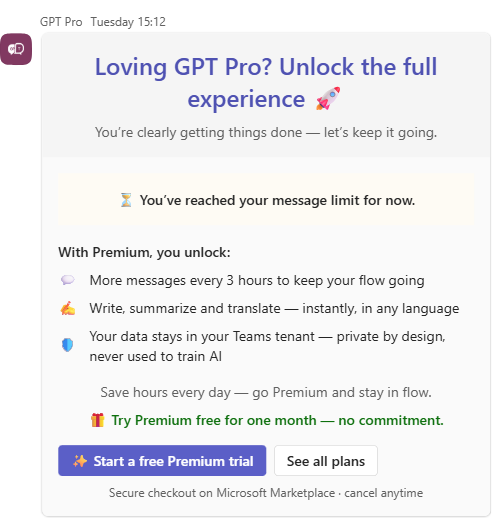
GPT Pro pauses and posts an upgrade card in the chat. The card matches the plan you are on:
- Free or Starter: you are offered Premium, with a Start a free Premium trial button and one month free, no commitment.
- Premium: you are offered Platinum, which has the highest allowance and priority support. Platinum has no free trial.
- Platinum: you see a plain notice that you reached your message limit for now, with no upgrade offer, because Platinum is the top plan.
# Response length
Each reply is generated with up to about 4,000 tokens. Very long requests may be answered in a summarized form. Ask a follow-up question if you need more detail.
# Conversation memory
GPT Pro remembers the earlier messages in your current conversation so it can keep context across turns. Starting a new conversation begins with a clean history.
# Language
GPT Pro replies in the language of your message. If your language is not supported, it responds in English. The interface is available in English, French, German, Italian, Portuguese, and Spanish.
# Content restrictions
For safety, GPT Pro declines questions about restricted topics such as war, weapons, drugs, medical or sexual advice, and politics or religion outside an educational context. For the full policy, see content filtering.
# Need more detail?
These limits maintain performance and reliability across the app. For anything not covered here, see the GPT Pro Q&A or contact support from the Teams-Pro Admin Center (opens new window).
← What's new Changelog →