
# Add Map Pro to a team
Add Map Pro to a Microsoft Teams team when you want the whole team to share the same map. Once the tab is set up, every member of the channel can open it to view saved Places and Trips, and members with the right access can add their own. Map Pro installs from AppSource, so there is nothing to download and no separate account to create.
# Add Map Pro from AppSource
- 1
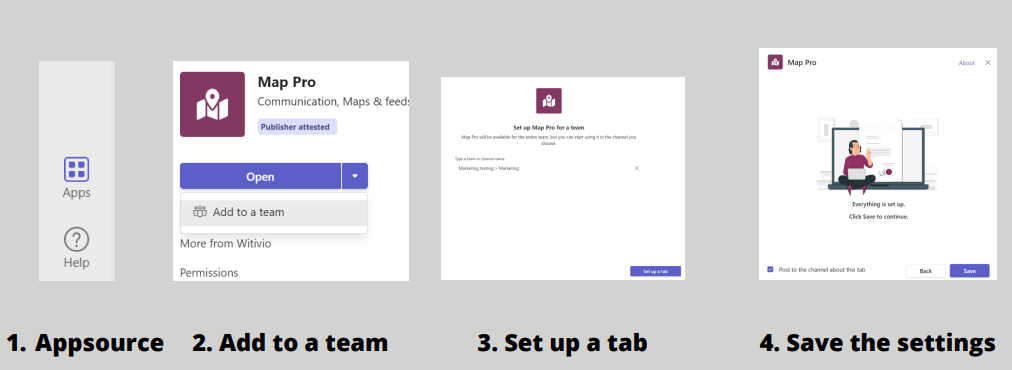
Open Microsoft Teams and click Apps (AppSource) at the bottom of the left navigation panel.
- 2
Search for Map Pro, then click Add to a team.
- 3
In Type a team or channel name, search for and select the target team.
- 4
Click Set up a tab.
- 5
Review the tab settings, then click Save in the pop-up window.
Map Pro is added as a tab in a channel of the team you select. Everyone in that channel can open the map, so pick the channel that fits how your team works.